
Property Dealer Follow-Up Software in India: A Practical Daily Routine
A useful follow-up system tells a property dealer who to call, why the conversation matters and what should happen next. Here is a practical routine for managing calls, buyer enquiries and site visits in Bhuvix.in.

A buyer says, ‘Call me after the weekend.’ Another wants to visit a flat on Saturday. A seller has promised to confirm the price tomorrow. None of these conversations is difficult to remember on its own. The problem starts when they happen between ten other calls.
Property dealer follow-up software should connect each customer to the last conversation, the person responsible and the next action. A reminder becomes useful when you can see why you are making the call, rather than just another name on a list.
Bhuvix.in puts customer history, enquiries, follow-ups and site visits in one digital office. This guide explains a routine you can adapt to your business, whether you work independently or with teammates.
Start with today, then look at what is overdue
Before calling anyone, review the follow-ups due today. Then check overdue work. A missed appointment from yesterday may need attention before a new enquiry that arrived a few minutes ago.
The dashboard brings the day’s calls and scheduled visits into view. It is a starting point for deciding your next action, not a substitute for your judgement about a customer’s urgency.
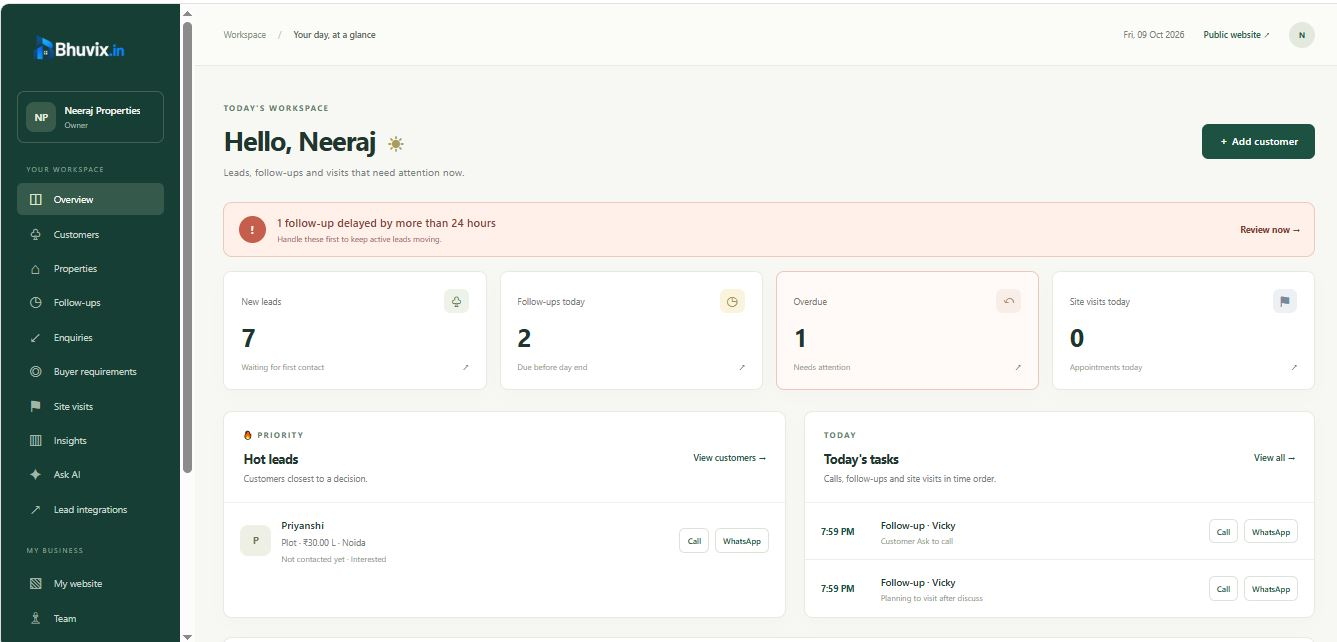
A workable morning routine is short:
- Review today’s follow-ups and visits.
- Check overdue items and decide what needs immediate attention.
- Open the customer history before making a call.
- Finish each conversation with a clear next step.
If you manage a team, give each customer a clear responsible person. When plan access allows assignment, that makes it easier to tell who should handle the next conversation.
Record what changed, not just ‘called customer’
A note saying ‘spoke to buyer’ is technically a record, but it does little for your next call. A useful discussion explains what changed.
For example, in a fictional enquiry: ‘Buyer prefers a builder floor rather than an apartment. Wants to see options on Sunday. Confirm family availability on Friday.’ That note gives you something to act on.
Keep the record factual. Separate the customer’s stated preference from your own interpretation, and avoid collecting personal information that your business does not need.
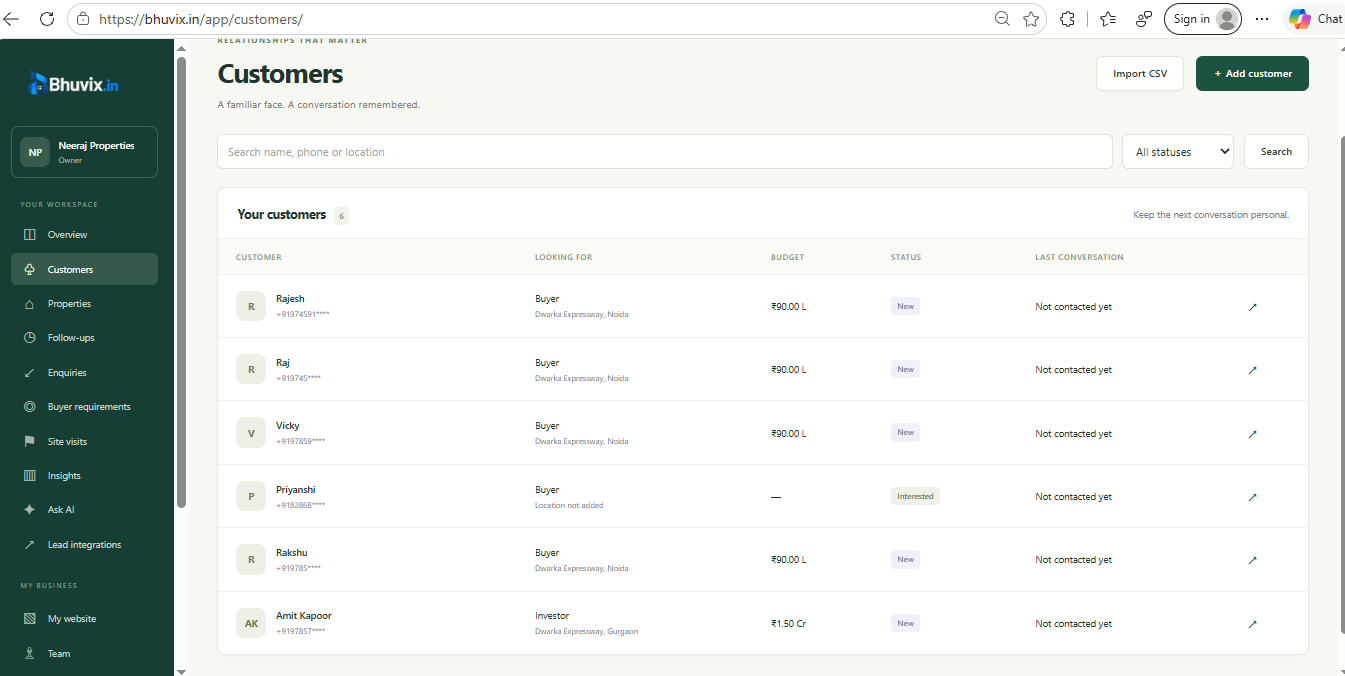
Bhuvix.in keeps discussions and activity history with the customer. You can return to the conversation instead of searching several notebooks or trying to remember which chat contained the important detail.
Give the follow-up a reason and a date
‘Follow up soon’ is easy to postpone. ‘Confirm Sunday’s visit on Friday afternoon’ tells you both the purpose and the timing.
Use the follow-up record for the next action, and the discussion for the context behind it. They serve different purposes: the discussion remembers the conversation, while the follow-up tells you what is due.
After completing the action, mark the follow-up appropriately. If the customer asks to postpone it, reschedule the task. If it no longer makes sense, cancel it rather than leaving it in the pending list.
This habit matters more than creating a large number of reminders. A smaller, current task list is easier to trust than a long list of calls that have already happened.
Treat a site visit as its own appointment
A visit needs more detail than ‘call buyer’. Link it to the customer and the property, record the scheduled time and update the visit’s outcome afterwards.
Once the visit is complete, save the customer’s feedback. Was the location unsuitable? Did the layout work but the price not fit? Is another family member going to visit? That feedback should shape the next conversation and, when necessary, the buyer requirement.
An enquiry can move forward, pause or change direction. Updating the customer stage alongside the discussion helps you see the present situation without erasing the history.
Review patterns at the end of the week
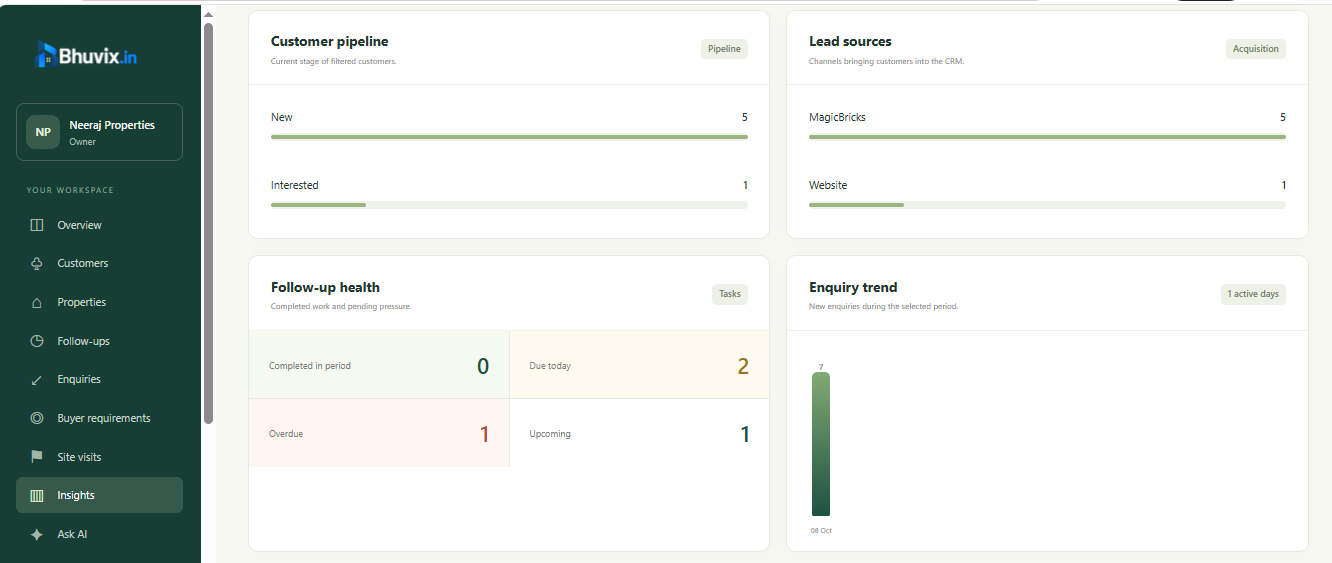
Business insights can help you review enquiry sources, customer stages and follow-up progress on eligible access. Use that view to ask practical questions: are overdue tasks growing, are visits being recorded consistently, and are customers reaching the next stage?
A report can show recorded activity. It cannot tell you whether every conversation was helpful or prove that a particular process caused a sale. Use the numbers alongside what your team learned from customers.
What to check before choosing follow-up software
Look for customer-linked history, dated tasks, visit scheduling, search and clear ownership. Check how the tool behaves on the phone you actually use between appointments.
Also check the plan’s customer allowance and team access. Do not assume that a follow-up tool automatically sends WhatsApp messages or emails: recording a task and delivering an automated message are different capabilities. Bhuvix.in’s follow-up records are not a promise of automatic customer messaging.
Common questions
What is property dealer follow-up software?
It is software for tracking a customer’s next action, due time and conversation history. A dealer can use it to organise calls, discussions and site visits without relying only on memory.
Can I manage follow-ups from my phone?
Bhuvix.in has a browser-based interface designed for phone and desktop use. You still need an internet connection and an account with the appropriate access.
Will the software automatically send a message to every customer?
Do not assume that it will. A follow-up task records work to be done. Customer messaging automation is a separate function and depends on the actual supported integration and configuration.
Does a completed site visit finish the follow-up process?
Not necessarily. Record the feedback, update the stage or requirement when appropriate, and agree the next step with the customer.
See the routine before choosing a plan
Explore the product tour to see the screens, review current plans for access and limits, or ask our team for a walkthrough. If you are also organising the properties you share, read our guide to keeping inventory and website listings current.